
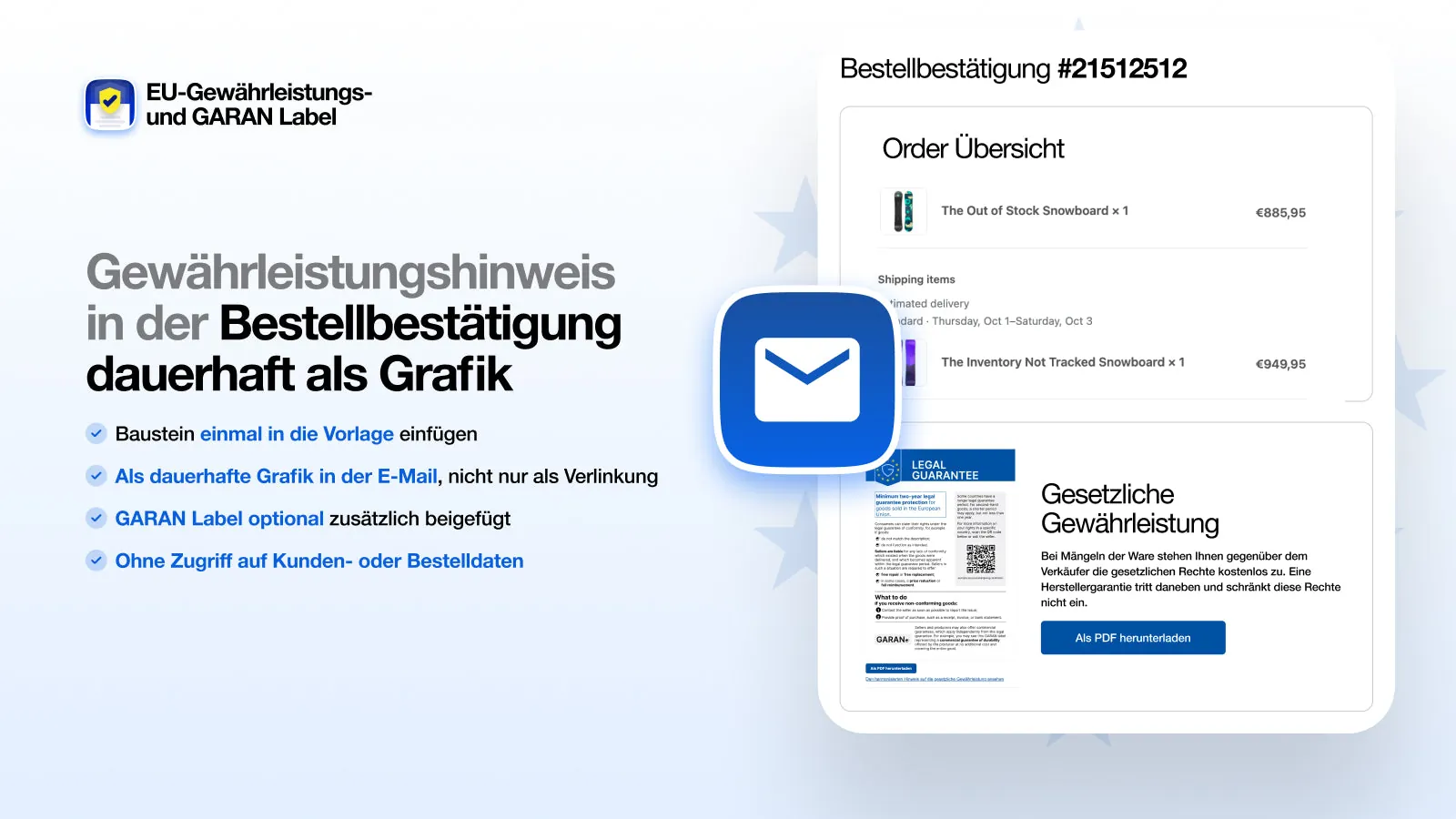
The European Commission recommends including the legal guarantee notice and, where applicable, the GARAN label in the order confirmation as well. For producer guarantees, the commercial guarantee statement must be provided on a durable medium at the latest at the time of delivery (Article 17(2) of Directive (EU) 2019/771). In Shopify, the order confirmation is the easiest place for both.
Most guides stop at the shop. The order confirmation is often forgotten, even though it is the document customers actually keep after buying. This page explains what belongs in it and how to add it in Shopify.
Does the legal guarantee notice belong in the order confirmation?
In its guidelines, the Commission says the notice should also appear in the confirmation email (guidelines, p. 20). The guidelines are not binding, but they build on an existing obligation: under Article 8(7) of Directive 2011/83/EU, the trader must confirm the contract to the consumer on a durable medium, including the mandatory pre-contractual information listed in Article 6(1). Since 27 September 2026, that information has included the harmonised notice on the legal guarantee of conformity (Article 6(1)(l), as amended by Directive (EU) 2024/825). Exception: if the consumer already received the information on a durable medium before the contract was concluded, it does not have to be repeated in the confirmation (Article 8(7)(a)).
In short: if you add the legal guarantee notice to the order confirmation, you follow the Commission’s recommendation. Whether an embedded image or a download link counts as a durable medium has not been settled; an attachment or the text in the email itself would be safest. The effort is small.
What to add for producer guarantees
For products with a producer’s commercial guarantee of durability, two things are added:
- The GARAN label, which the guidelines also recommend for the confirmation email.
- The commercial guarantee statement under Article 17(2) of Directive (EU) 2019/771. It is owed by the guarantor, here the producer; the trader informs the consumer about the existence and conditions of the guarantee (Article 6(1)(m) of Directive 2011/83/EU). The statement must be provided on a durable medium at the latest at the time of delivery. An email is such a durable medium.
The guarantee statement contains a clear statement that the consumer is entitled by law to remedies from the seller free of charge, which the guarantee does not affect, the name and address of the guarantor, the procedure for making a claim, the goods covered and the terms of the guarantee. More on the GARAN label page.
What it looks like in the order confirmation
Thank you for your order!
Hi Alex, we have received your order and are getting it ready now.

Legal guarantee of conformity
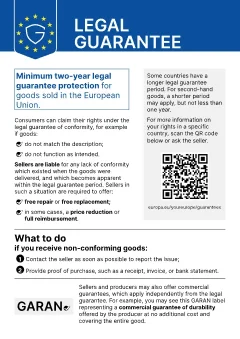 Download as PDF
Producer guarantee
The producer has given a guarantee for the following items in your order.
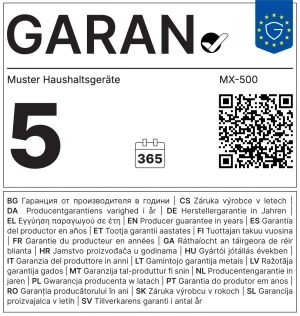 Download GARAN label
- Guarantor
- Sample Appliances Ltd, 1 Sample Street, 12345 Sample Town
- Goods covered
- MX-500 blender
- Guarantee duration
- 5 years
- How to make a claim
- Contact service@sample-appliances.com with your proof of purchase
- Terms
- Valid in Germany and Austria for normal use
- Legal guarantee of conformity
- In the event of defects you are entitled by law to remedies from the seller free of charge. A producer guarantee applies alongside those rights and does not limit them.
This statement is provided to you on a durable medium with this email (Article 17(2) of Directive (EU) 2019/771).
| The order contains | In the confirmation |
|---|---|
| Only products without a producer guarantee | The legal guarantee notice as a graphic, plus a button to download the official PDF version |
| At least one product with a producer guarantee | In addition, the GARAN label and the guarantee statement for exactly those products |
Add the legal guarantee notice to the Shopify order confirmation
Without an app, you would have to upload the graphic to your Shopify files, extend the “Order confirmation” template under Settings → Notifications with Liquid and build a separate version for each shop language. For guarantee statements you would also need a condition for each product.
With our app it takes three steps:
- Open the template
In the app, click “Open notifications”. Shopify shows the order confirmation template. - Insert the snippet
Copy the snippet from the app and paste it at the end of the template. - Send a test email
Shopify sends a test confirmation. It shows the legal guarantee notice and, for guarantee products, the GARAN label and the guarantee statement.
The snippet adds the legal guarantee notice to every confirmation. The GARAN label and the guarantee statement appear only if the order contains a product with a guarantee. The app reads no customer data for this; Shopify fills in the details itself when sending. The snippet is available in German, English, French, Italian, Spanish and Dutch. It follows the language of your Shopify admin, and the graphic and PDF come in that one language.
See the app on the Shopify App Store
Graphic in the email, PDF to download
The app’s snippet places the legal guarantee notice as an image (PNG) directly in the order confirmation. Below it is a button that lets customers download, save and print the official PDF version. For guarantee products, the GARAN label is added as an image with its own download button, and the guarantee statement as text. Shopify cannot send file attachments with order confirmations.
Last reviewed: 3 October 2026. This page is not legal advice.
Frequently asked questions
Is the legal guarantee notice in the order confirmation mandatory?
The law does not expressly require it. But the Commission recommends it, and the confirmation of the contract under Article 8(7) of Directive 2011/83/EU must contain the mandatory pre-contractual information, which includes the harmonised notice.
Is a link to the legal guarantee notice in the email enough?
A plain link generally does not count as a durable medium, because the linked page can change. Safer options are the graphic in the email itself, or an attached or permanently available PDF version.
Where do I find the order confirmation template in Shopify?
Under Settings → Notifications → Customer notifications → Order confirmation. There you can edit the template code.
When must the guarantee statement reach the customer?
At the latest at the time of delivery, on a durable medium (Article 17(2) of Directive (EU) 2019/771). An order confirmation by email meets this, because it arrives before delivery.