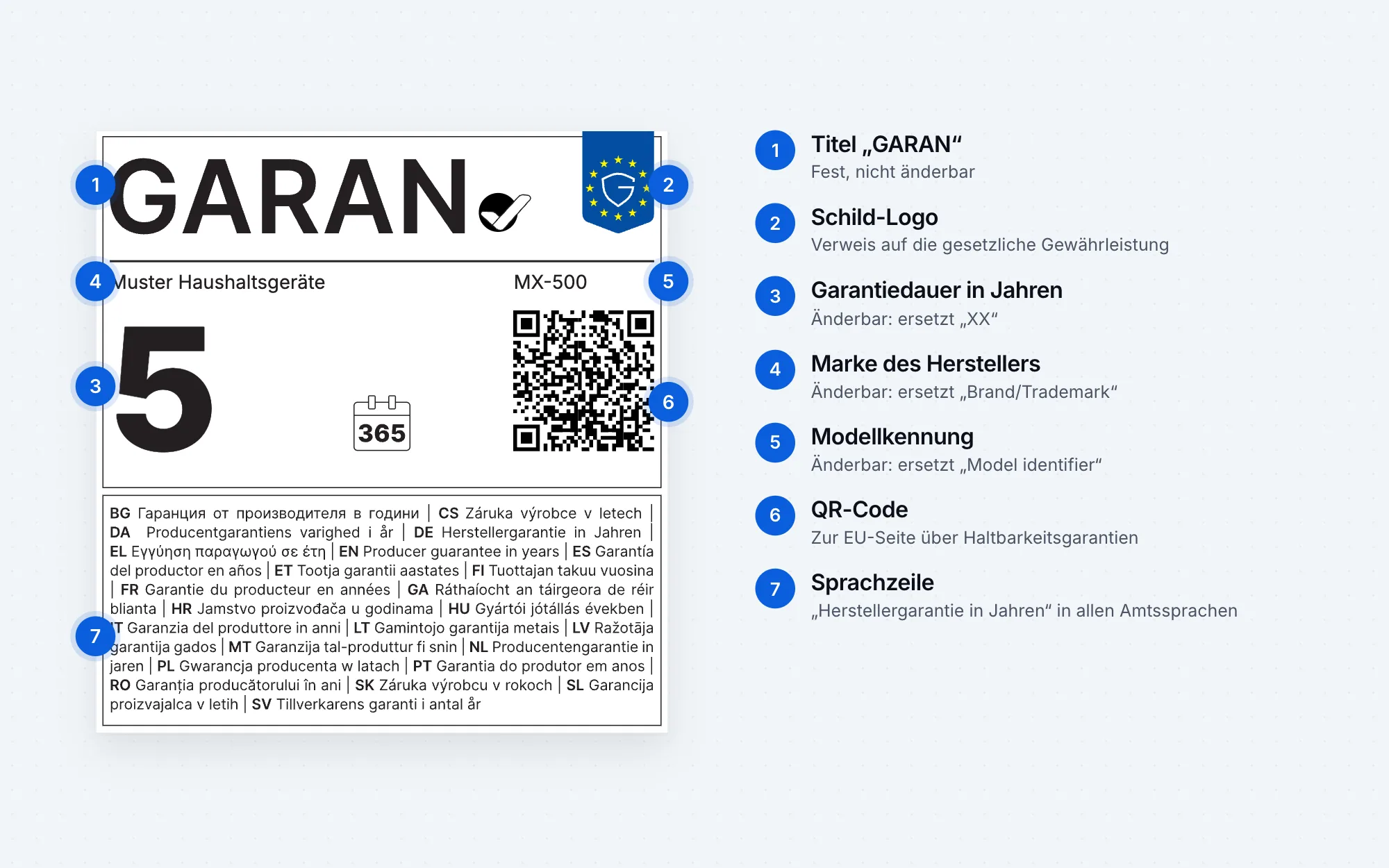
The GARAN label API creates labels under Annex II of Regulation (EU) 2025/1960 from three details: guarantee duration in years, brand and model identifier. Each new combination costs one credit; fetching the same combination again is free. Single labels from the generator on this website remain free.
Authentication
Every request carries the access key in the header Authorization: Bearer gl_…. You create the key in the account area of the generator (in German) after signing in with your e-mail address. A new key replaces the previous one. Never put it in public source code or browser code; use it server-side only.
Create a label
POST https://www.garantielabel.app/api/v1/labels with a JSON body:
| Field | Required | Description |
|---|---|---|
jahre | Yes | Guarantee duration in years, more than 2, whole or half years: "5", "2.5" or "2,5" |
marke | Yes | Name of the producer offering the guarantee, up to 40 characters |
modell | Yes | Model identifier, up to 24 characters |
variante | No | full-colour (default), nested (online only) or full-bw (black and white, offline only) |
Response as JSON: {"svg": "<svg …", "neu_berechnet": true, "guthaben": 99, "id": "…"}. Here guthaben is your remaining credit balance and neu_berechnet shows whether the label was newly created and charged. With the header Accept: image/svg+xml you get the SVG file directly; balance and billing are then in the headers X-Guthaben and X-Neu-Berechnet.
Examples
curl
curl -X POST https://www.garantielabel.app/api/v1/labels \
  -H "Authorization: Bearer gl_…" \
  -H "Accept: image/svg+xml" \
  -H "Content-Type: application/json" \
  -d '{"jahre":"5","marke":"Example","modell":"MX-500"}' \
  -o GARAN-MX-500.svg
PHP
$ch = curl_init("https://www.garantielabel.app/api/v1/labels");
curl_setopt_array($ch, [
  CURLOPT_POST => true,
  CURLOPT_RETURNTRANSFER => true,
  CURLOPT_HTTPHEADER => ["Authorization: Bearer " . getenv("GARAN_API_KEY"), "Content-Type: application/json"],
  CURLOPT_POSTFIELDS => json_encode(["jahre" => "5", "marke" => "Example", "modell" => "MX-500"]),
]);
$label = json_decode(curl_exec($ch), true);
file_put_contents("GARAN-MX-500.svg", $label["svg"]);
JavaScript (Node.js)
const response = await fetch("https://www.garantielabel.app/api/v1/labels", {
  method: "POST",
  headers: { Authorization: `Bearer ${process.env.GARAN_API_KEY}`, "Content-Type": "application/json" },
  body: JSON.stringify({ jahre: "5", marke: "Example", modell: "MX-500" }),
});
const { svg, guthaben } = await response.json();
Check your balance
GET https://www.garantielabel.app/api/konto with the same key returns {"angemeldet": true, "email": "…", "guthaben": 99, "labels": 1}.
Errors
| Status | Meaning |
|---|---|
| 400 | Invalid details, e.g. two years or less. The message is in fehler (currently in German). |
| 401 | Key missing or unknown. |
| 402 | No credits left. A new package tops up the same key. |
| 409 | The same label was requested at the same time. Please repeat the request; it is only charged once. |
| 413, 415 | Request larger than 8 KB or not sent as JSON. |
| 429 | Too many requests: at most 600 per minute and 30,000 per day per account. Wait briefly and send again. |
What the label contains
The API uses the European Commission’s original template and replaces only the three editable fields, with the font Inter embedded. The SVG file is self-contained and needs no external files.
Credits for the API are sold as packages from €4.90 net to businesses only, with no subscription; prices and checkout are on the German generator page (in German). For single labels, use the free GARAN label generator.